From AI Testing to Designers
Shipping the Fix
As Usability Lead for Ads Manager, I built an AI workflow that changed how our team dogfoods: from automated persona testing to shipping the frontend fixes myself. It cut our design to ship cycle in half.
I own the whole loop, from automated testing to shipping the frontend fixes myself. When a designer can put fixes into production, product quality stops waiting on engineering bandwidth.
Keeping our flow at the org’s quality bar is a manual job. My team owns the experience advertisers use to promote an app; as its Usability Lead, I own that bar. We enforce it two ways, both by hand: quarterly dogfooding with our design leads, and rigorous external scoring from a central usability team.
In H1 2026, as the org began adopting AI, I asked a sharper question: how do I streamline that whole loop for my team, not just speed up one step?
The dogfooding loop, rebuilt
Every finding in the old loop, big or small, had to squeeze through the same gate: one quarterly prioritization session and a finite pool of engineering bandwidth. Big problems earned their spot. Small UI fixes queued behind them and rarely shipped, piling up as usability debt. Learning to vibe code as a designer clears that bottleneck. I find the issue, then ship the fix myself.
Automating UX Evaluation
Most of this work lived in systems design, cognitive modeling, and service design, not in Figma.
Eliminate inconsistency
Manual dogfooding surfaces different issues depending on who runs it. My CAPTURE → EVALUATE → ACT protocol runs an identical pass every session, so findings don’t hinge on the tester.
Scale coverage
One person now runs several sessions a day across personas and platforms, each a structured report with every issue graded against Meta’s quality rubric. A week’s work, done in an afternoon.
Embed the user’s perspective
It doesn’t just check whether things work. It plays specific advertiser archetypes, catching confusing defaults, jargon, and missing controls that functional testing walks right past.
Beyond Prompt Engineering
Steering the LLM, not just prompting it
The prompts hold the agent in character all session and block lazy AI habits like defaulting to “add a tooltip.”
Automating what everyone says needs a human
I broke “judgment” into concrete checks: can the persona tell what this page is for? Do they know what to do next?
Personas built from Meta’s own frameworks
Distilled from our Product Quality Scorecard and Usability Playbook, so the agent grades the way my team does.
Runs against the real shipped flows
Our codebase is linked in Claude, so the agent tests the actual app-ad flows from source, not whatever a test account surfaces.
Five sources of internal design knowledge, the same standards my team already used to judge quality, became a single evaluation protocol the agent runs every session.
Filed straight into the tools the team already uses, ready to triage the moment a run ends.


I model personas by how someone thinks. Run the same screen through Marcus and Priya and one default flips from a power user’s frustration to a beginner’s relief, a conflict the same design has to resolve.
Advantage+ defaulting ON is a retention risk and a retention aid at the same time, depending only on who’s looking. The persona system catches that contrast on every run, instead of leaving it to whoever happens to be testing.
What One Session Surfaced
For its first production run, the agent took Enterprise Marcus through the full App Promotion flow on iOS and Android, back to back, in about 90 minutes. One pass surfaced 18 issues, including things our manual sessions had been walking past. I’ve kept running it since; the numbers on this page are from that first session.
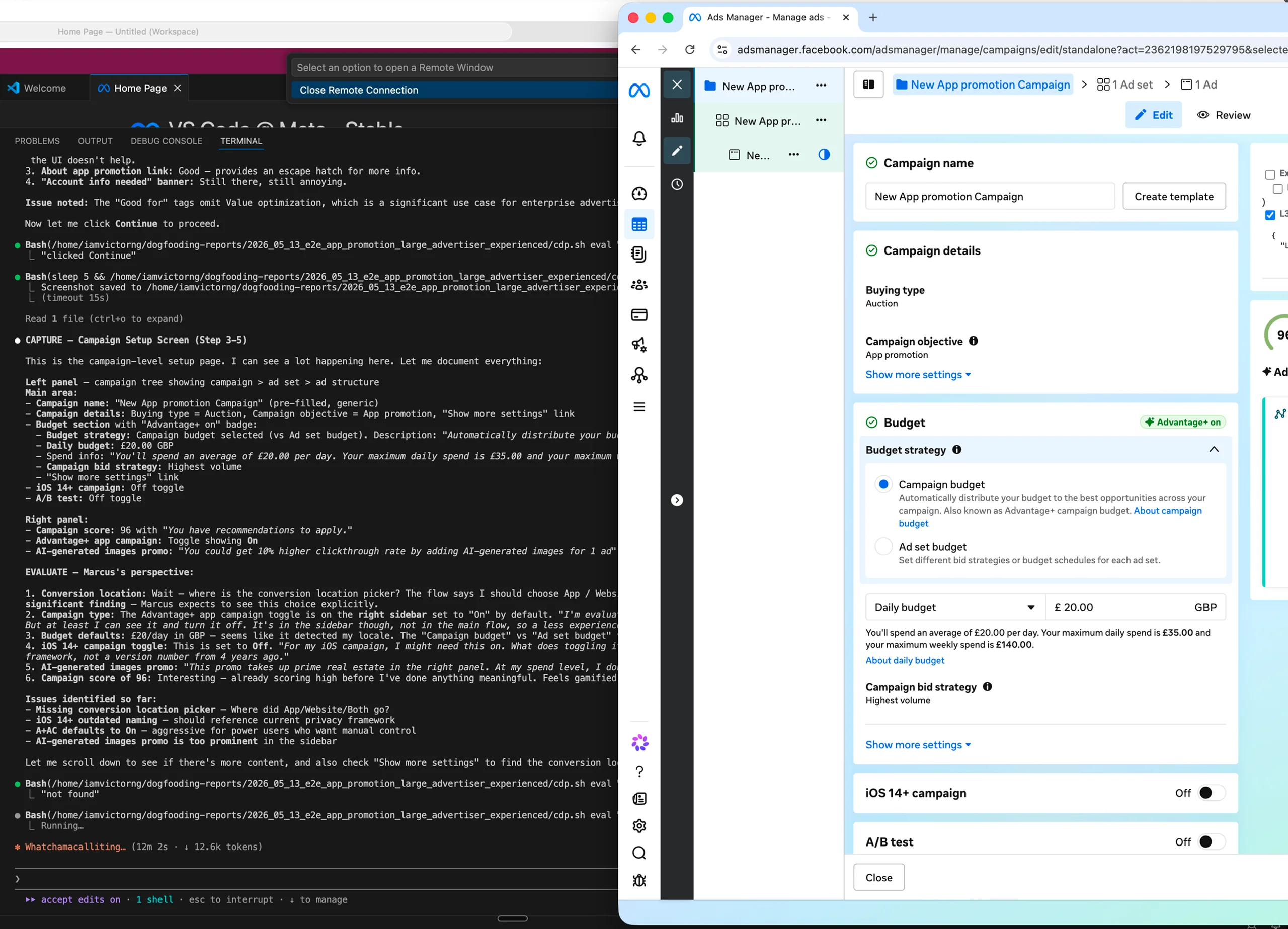
When we dogfood our own product, we rarely step all the way into the advertiser’s shoes, so issues like these slip right past us. The agent doesn’t have that problem. Each one is filed as a task in the persona’s own voice, with the structured record attached for triage.
SKAdNetwork configuration missing
The ad set has no SKAdNetwork section, so enterprise advertisers can’t configure their iOS measurement. Wrong defaults quietly degrade reporting, a real risk for advertisers spending $2M+/month.
Enterprise Marcus
“I scrolled through the entire ad set for my iOS campaign. Where is SKAdNetwork? If the system is making SKAN decisions for me, I need to know what they are.”
A single report was never the goal. I wanted a system that runs the same way every time, faster, and catches what a tired tester on one platform would miss, like the cross platform bugs it caught running iOS and Android back to back.
The agent isn’t a replacement for manual testing. It handles the repetitive parts and hits both platforms every run, so I spend my time on the judgment calls instead of the clicking. A human still catches what it misses, and every issue it flags is still mine to verify.
I Found the Issues, Then Shipped the Fixes Myself.
The agent gave me a reliable, repeatable way to surface issues. But I didn’t stop at filing tickets. I tested every issue it flagged, confirmed it was real, then used vibe coding to write the frontend fix myself. An engineer on the team reviewed every diff before it landed in production.
Learning enough to close the gap between finding a problem and shipping the fix is what changed how I work. 10+ frontend changes landed in a single week, fixed by the person who understood the UX problem best instead of waiting for sprint planning.
A usability pass flagged the Attribution model field in ad set settings: an always-visible dropdown adding clutter to an already dense page, out of step with neighboring fields like Performance goal that stay collapsed until you need them. I converted it to the same progressive disclosure pattern, a read-only summary that expands to the full selector on click, then shipped it. An engineer reviewed the diff before it landed.

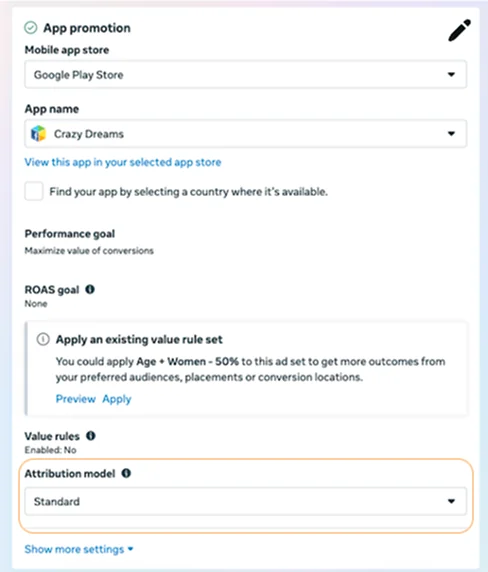
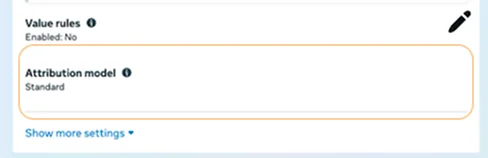
The system now runs the same way for our team dogfooding sessions. The agent handles detection, I handle verification and fixes, and an engineer handles review. The whole design to ship cycle dropped by half.
When design can ship frontend, the small fixes that used to die in prioritization get caught by the person who cares most. Design holds the quality bar and enforces it directly in the code.
What I’d Watch, and Where It Goes
This didn’t stay my experiment. Once it was working, I presented it to our usability design leads, who adopted it across the org as a shared skill for other teams to fork and iterate on. I’ve built it twice now; a third would take about a day, so it’s a template, not a one-off.
Today the skill stops once an issue is filed. Next is closing the loop: let it propose the fix, then rerun the same session after the fix ships to confirm it held. That turns a testing tool into regression detection on a schedule.
The full two platform pass is token heavy. On a tight budget I’d cut scope before rigor: point runs at whatever changed that week instead of the whole flow, drop to one persona per session, and capture screenshots only on failures. Judgment calls are where the spend pays off, so screen description would move to a smaller model first.
- Still a small sample. The headline numbers come from the first session. Later runs have told a similar story, but this is early data, not a study.
- Personas validated only by me. Built from internal docs and my own read, never sat next to a real advertiser.